This post covers the steps required to configure SSO (SAML 1.1) with SOA 11g. Having Single Sign On(SSO) enabled helps the end users as they don't have to remember different username/password combinations for different applications. When tied with a LDAP provider (Like Microsoft Active Directory or Oracle Internet Directory), SSO helps in providing a robust authentication mechanism along with a seamless user experience.
SOA 11g and weblogic have made the SSO configuration very easy for administrators. Its all done on the Weblogic Admin console and doesnt require running any backend scripts or changing files on windows/linux. So lets take a look at some screenshots which show this easy setup.
Create a new Authentication provider (SAMLIdentity Asserter) and reorder to make sure it looks as below.
 Create a new Asserting party and specify
properties as shown below
Create a new Asserting party and specify
properties as shown below


 Finally under Managed Server -> Federation Services configure your SAML 1.1 Destination as shown
below


SOA 11g and weblogic have made the SSO configuration very easy for administrators. Its all done on the Weblogic Admin console and doesnt require running any backend scripts or changing files on windows/linux. So lets take a look at some screenshots which show this easy setup.
Create a new Authentication provider (SAMLIdentity Asserter) and reorder to make sure it looks as below.


Create a new trusted certificate (same alias as above screenshot) and import the certifcate(.der) file.
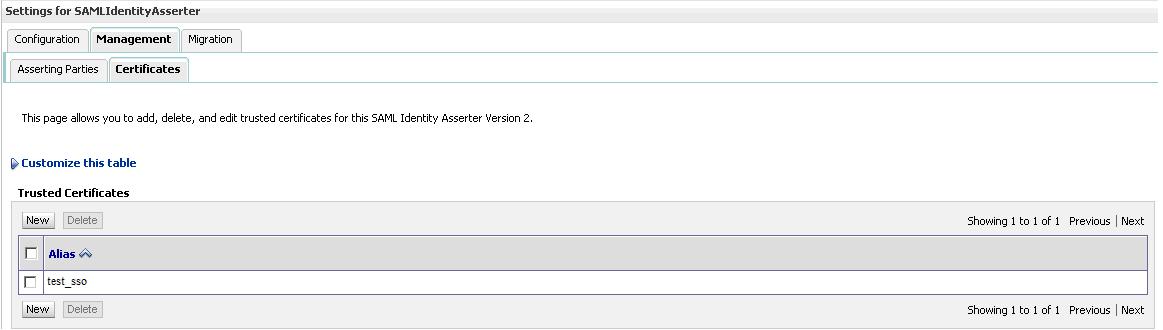
below

That's it. Restart the Admin and Managed servers and you should be able to see the SSO redirection happening correctly. Basically whenever you hit your URL (bpm workspace in above screenshot) you should be redirected to your SSO site which should then pull up your user credentails from LDAP provider (lets says NT login) and authenticate you so that you dont have to login explicitly to your URL.
Incase you want to turn on Debug for SSO/SAML to troubleshoot issues with redirection or other errors, follow the below steps in your Weblogic Admin Console. Select Lock & Edit and click on your managed server and under the Debug tab, expand Weblogic->Security and select SAML and click on Enable and save. That's it. You should be able to see the Debug messages related to SSO/SAML in your Managed Server log file now.


