Showing posts with label Ebusiness Suite. Show all posts

Monday, March 19, 2012

Webcasts On SOA Integration Options for Oracle Ebusiness Suite

Came across these webcasts from Oracle Applications Technology Group regarding the various SOA Integration Options for Oracle Ebusiness Suite. I had already covered most of these options in an earlier post here http://myexperienceswithsoa.blogspot.com/2010/06/soa-integrations-with-oracle-ebusiness.html

These webcasts provide in-depth sight into the topic along with some demos. Check them out if you are pondering over how to integrate with Oracle Ebusiness Suite.

E-Business Suite R12 Service Oriented Architectures (SOA) Using the E-Business Suite Adapter
SOA Integration Options for E-Business Suite

NOTE: You will require OTN userid/password to login and access the content of the webcast.

Sunday, August 1, 2010

New updates to Oracle E-Business Suite Integrated SOA Gateway(ISG) with R12.1 ATG RUP3

Oracle has recently released the R12.1 ATG RUP3 patch which brings along with it many new features to the Integrated SOA Gateway(ISG) product. I had talked about ISG in one of my earlier posts soa-integrations-with-oracle-ebusiness. Its a nice product which allows system integrators to design solutions surrounding integrations with Oracle Ebusiness Suite using out-of-the-box features. Most of the updates coming along with this patch have been around enhanced administration capabilities for the product.


More details about the new added features can be found from below links:
New features overview
Enhanced logging in ISG
Enhanced Service Monitoring 
Securing WebServices with ISG

Saturday, July 10, 2010

Some FAQs about SOA based integration with Oracle Ebusiness Suite

I started my SOA journey with Oracle products like IREP, EBS Adapters and Integrated SOA Gateway and having interacted with multiple Oracle Apps customers who were planning to venture into the world of SOA, I thought of putting some frequently asked questions about SOA integrations with Oracle Apps. This post will be more helpful for beginners rather than SOA practioners already involved with these kind of integrations.


1. Do we need to install Oracle Fusion middleware separately and then integrate with R12 or is it included in R12 ?? Also do we need a separate license for that ?

Incase you are planning an upgrade of your existing Ebusiness version from 11i to R12 and also want to integrate with Oracle Fusion Middleware(OFMW), please note that you have to separately install OFMW. The integration with Ebusiness is done using EBS Adapters. The separate installation of OFMW contains the SOA Suite components of BPEL Process Manager, ESB server, adapters etc which arent shipped with the scaled down version of R12 techstack (Oracle application server). And Yes OFMW is licensed separately.

2. Do we have any training links for learning more about SOA Integrations with EBS ?

3. What is Application Context and how is it set for EBS Adapters ?
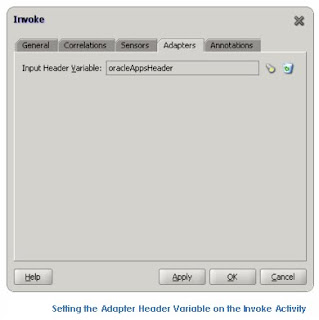
In order to support application-level security to authorize use of its APIs,the Oracle E-Business Suite Adapter allows the use of a header variable in the BPEL process. At a minimum, the header variable must contain the application username and responsibility to use to pass application level authorization. Additionally it can contain the organization to use for the username and responsibility, depending on the version of E-Biz and whether E-Biz is configured to use multiple organization units. Since a BPEL process can invoke multiple PL/SQL using this header variable, this is usually declared as a global variable of the header type and assigned the username and responsibility early in the BPEL process.
  • When we create a partner link service,JDeveloper creates a WSDL named procedureAdapterHeader.wsdl that defines the message type for the Oracle Applications header, so we only need to create a global variable of this type.
  • Then, an assign activity is added to the BPEL process that allows the global header variable to be initialized for use later.
  • Then, when the Invoke activity in the BPEL process is added for adding a task in E-Biz, we select the variable storing our E-Biz credentials to use in the API using the “Browse” flashlight icon. That’s it! And now we can access the APIs we select without errors from Oracle.


Also please note that JDeveloper does embed a standard username and responsibility in the partner link WSDL it creates for E-Biz APIs. By default it will embed a username of “sysadmin” and responsibility of “System Administrator” in the
in the WSDL, so if that works fine for your installation and the APIs you need to access, then you won’t need to even use a header variable to setting your application context explicitly in the API call.


4. What is WF_BPEL_Q and where is it used ? Do we have a procedure or concurrent program to clean up/purge records from table WF_BPEL_QTAB?


WF_BPEL_Q is an advanced queue which comes into picture when we are doing integration with Oracle Apps business events system. Apps is preconfigured with numerous Business Events and each Business Event represents a ready to use Integration or extension point.When a user from Jdeveloper creates/configures an EBS adapter as a partner link and selects the APPS event to be listened , following activities happen in backend:
  • WF_BPEL_QTAB queue table created, if it does not exist.
  • WF_BPEL_Q queue created, if it does not exist.
  • Start WF_BPEL_Q
  • WF_BPEL_QAGENT , if it does not exist
  • Create and start wf_bpel_qagent listener, which listens on WF_BPEL_Q.
  • Event subscription for that particular event in WF_EVENT_SUBSCRIPTIONS table , if it does not exist.Note that for a particular event , only 1 event subscription is created irrespective of number of BPEL processes (you can have more than 1) subscribing to it.
  • AQ Subscriber to uniquely identify the BPEL process consuming the event. This subscriber is created in APPS.AQ$_WF_BPEL_QTAB_S table. This subscriber is needed since consuming business event is dequeue operation and each BPEL process consuming the event should identify itself with unique subscriber name. So ,say bpel1 and bpel2 subscribe to event1 ,two subscribers would be created in APPS.AQ$_WF_BPEL_QTAB_S table so that AQ knows it has to provide event message to bpel1 and bpel2.
  • When the BPEL process is deployed in the BPEL PM, the listener keeps polling the WF_BPEL_Q with whatever freqeuncy we have defined.
  • Once the corresponding event is raised , it is enqueued into the WF_BPEL_Q and the listener(spawned by BPEL PM) which is listening to this event, would dequeue this and starts the BPEL process.
A common maintenance question is how to purge records from the table WF_BPEL_QTAB if they are huge in number .Or whether there are any seeded concurrent programs or procs doing this job.

Well there are no purge programs which does purging of messages from this queue table. This being an AQ table,it should work like any other AQ where once the retention time is reached the record will be cleaned up by the background DB processes.For WF_BPEL_Q retention time is 86400 seconds.. ie 1 day; message would be retained for 1 day after successful dequeue of the message by all the registered subscribers.

However if there are discrepancies observed in removal of records there can be 2 reasons:

  • Say if subscriber(BPEL Process) A and B are registered to receive message, and only A has dequeued it, the message would sit indefinitely unless B too dequeues it. After both A and B dequeue, message would then be removed.
  • Another reason maybe when there are some wrong BPEL processes( subscribers here) registered for the business event and never dequeued it. In that case you can check out the subscribers table for WF_BPEL_Q i.e aq$wf_bpel_qtab_s and remove all the stale subscribers from it. Removing subscribers automatically removes the messages meant for it.
5. Does EBS adapter support custom PL/SQL APIs created in schemas other than APPS ? Also can Custom objects like PL/SQL APIs or Concurrent Programs be exposed to IREP UI by customers ?

Almost 90% of Oracle Apps customers have some or the other kind of customizations existing in their implementations. They would definitely like to have these custom objects exposed to the IREP UI so that they can be used for integration scenarios.

EBS Adapter does support custom PLSQL APIs created under Apps schema and shows up these in the Application Module Browser screen of Jdev while configuring the adapter. However this support is limited to objects created only under Apps schema and doesnt extend to custom objects under non-Apps schema.

Also starting with Release 12.1.1, we have a standalone IREP parser script being made available to customers (after application of some one-off patch) which lets them expose their custom objects to the IREP UI. This support doesnt exist in IREP of R12 or 11i. To learn more about How to Customize IREP please check the blog
http://blogs.oracle.com/integration_repository_customization

Tuesday, June 8, 2010

SOA Integrations with Oracle EBusiness Suite (aka. Oracle Apps)

Oracle Apps started its first steps towards SOA with the introduction of a product called Integration Repository (IREP). This served as a catalog of the numerous interface endpoints which exposed by Oracle apps. The SOA evolution continued with the introduction of Oracle EBS Adapters. The EBS adapters exposed the Integration points/interfaces as Standard Web Services and translated the data from proprietary data format to a standard data representation like XML. In its latest release of 12.1.1 and higher Oracle Apps has out-of-the-box SOA capabilities in form of Native Service Enablement. This post will cover some of details about the SOA evolution in Oracle Apps.


Integration Repository (IREP):


IREP acts a source of truth for all integration projects. It has a powerful UI for searching and viewing available Interfaces exposed by Oracle Apps. It is kept in synch with latest source code via standard apps patching technology.

To access IREP you can use any of the below options:
  • From within Apps, you need to add a Responsibility : Integration Repository (In R12) and Integrated SOA Gateway (In R12.1.1 and above)
  • For 11i , you can use Oracle's hosted instance of Integration Repository at http://irep.oracle.com/ (with appropriate registration)
Data in IREP is organized for browsing and searching by interface types,which are based on the underlying integration technology used. The Various Interface types available in IREP are:
  • Java Service Interfaces/Service Beans
  • Service Data Object
  • Web Services
  • XML Gateway Message Maps
  • PL/SQL Procedures and Functions
  • Java Methods
  • Concurrent Programs
  • Open Interface Tables
  • Interface Views
  • EDI Message Transactions
You can also upload custom objects to IREP and expose them as integration end points. This facility is available in R12.1.1 and above with the help of a standalone IREP parser script which generates ildt files which can be later uploaded using FNDLOAD.

Ebusiness Adapter:

Ebusiness adapters are available out-of-the-box, have a wizard driven configuration, leverage IREP and expose only the public interfaces and generate the adapter metadata as WSDL files with JCA extensions.

Here is a screenshot of how the application module browser in Jdeveloper looks like (this screen appears in the adapter configuration wizard)


Some commonly used integration points are as below:

1. Integration with PLSQL APIs

2. Integration with Business Events
E-Business Suite is preconfigured with numerous Business Events and each business event represents a ready to use Integration point. These Integrations involve the advanced queue named WF_BPEL_Q which is created during creation of the EBS Adapter service. At runtime a WF_BPEL_QAgent Listener polls this queue and incase new records are found the corresponding BPEL Process is triggered.

3. Integration with Open Interface tables and concurrent programs.
BPEL processes insert data into the Open interface tables/staging tables, on which concurrent programs run,validate data and push the data into final base tables.

Other integration scenarios include integrations with XML Gateway maps primarily used for B2B scenarios for data exchange with Oracle trading partners.

R12.1.1 and Integrated SOA Gateway (ISG):

Service enablement feature in R12.1.1 and above is provided out-of-the box.
For R12 if we had to call some interfaces in Apps, it was done making use of EBS adapters . A separate BPEL process had to be created which used EBS Adapter to call the exposed Integration interface from IREP and generated the corresponding WSDL file. Simply speaking this was done outside of Apps.

However in R12.1.1 and above the adapter framework has been embedded within Apps techstack and the WSDL generation is done from the Apps pages itself.


Some major components of this new product/feature are:

Service Generator
This generates a native service(WSDL) for a particular interface registered in Integration Repository.

Enhanced Integration Repository (IREP)
It provides generate, regenerate, deploy and redeploy buttons on the interface pages itself. Extensible as it allows loading of custom interfaces . Also has support for composite BPEL.

SOA Provider
It deploys/undeploys the native services to Application Server. Also identifies and processes inbound soap requests.

SOA Monitor
It keeps track of the incoming SOAP requests and responses.

Service Invocation Framework (SIF)
It is used to invoke external webservices from within Apps leveraging the workflow business event system.